
We build, we grow, and we manage it together every month.
How we work, step by step
Quote and plan
You tell us about your business, your customers and your goals. We propose which services to start with, the timeline and the price; for larger projects we have a short call first.
QuoteSetup
Site, map listings, ad accounts, social media profiles and tracking are set up, with a design built for your business or a quick-setup theme.
Timeline in the proposalWe grow it every month
SEO and AI visibility, reviews, ads, social media, maintenance and content. All planned, all measured.
MonthlyYou keep track
You see orders, requests and ad results in Leblebidji Panel. Once a month, a short report explains what worked.
Every day, as much as you likeWhat do we do each month?
Depending on the services you choose, this work gets done for you every month. How much of each is written down from the start.
SEO and AI
- Technical checks and fixes
- Content that answers questions
- Map listings and business profile
- AI visibility tracking
Reviews and rating
- Review requests
- A reply to every review
- Monthly review analysis
Advertising
- Google Ads: search terms, budget and ad copy
- Meta: creatives, audiences and retargeting
- Spend and conversion tracking
Social media
- Monthly content calendar
- Preparing and publishing posts
- Comment and message monitoring
Site and content
- Product, price and promotion updates sent via WhatsApp
- New pages and blog posts
- Image editing
Maintenance and security
- Updates and backups
- Speed and security checks
- Quick response when something goes wrong
What happened this month, on one page?
Not a pile of numbers: a short report on what worked, what we changed and what’s next.
- Visitors and where they came from
- Google rankings and map interactions
- Visibility in AI answers
- Rating and reviews
- Ad spend, clicks and conversions
- Orders, bookings and form submissions
- Next month’s plan
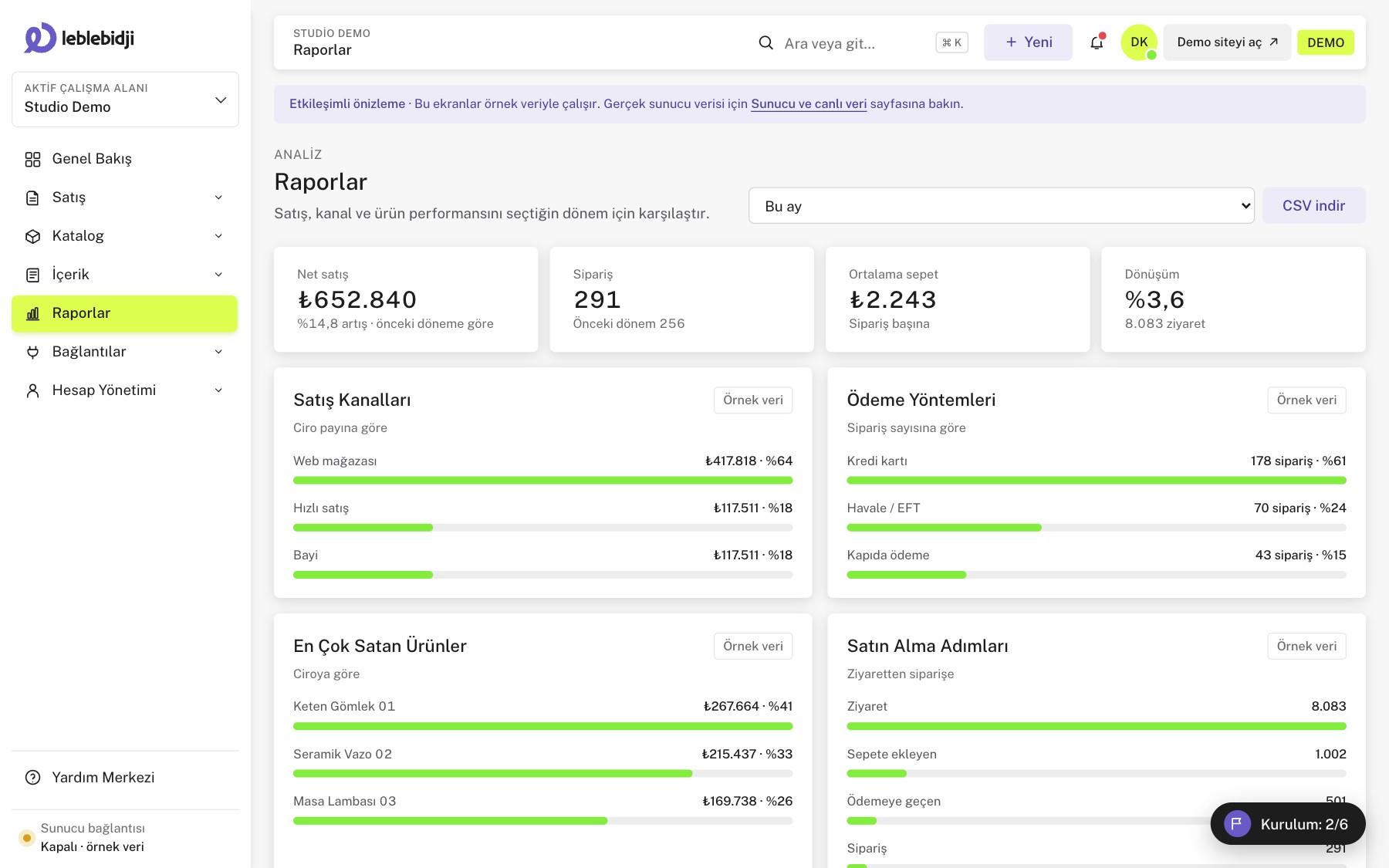
Your dashboard: daily work on one screen.
The dashboard we built ourselves comes with every setup, at no extra charge. You follow orders, stock and content here; the technical settings are on us.


Start the day with one screen
Today’s revenue, orders, visitors and conversion, compared with yesterday, on the first screen. Below them, the tasks that need you today.
- Orders awaiting payment, orders to pack and low-stock items open in one click
- Breakdown by city, device and traffic source
- Step-by-step setup guide for a new store
One flow from order to shipment
Web, phone and dealer orders in the same list. Filter by payment, packing and shipping status, and act in bulk.
- Filters for payment, packing, shipping and problem orders
- Bulk status updates and CSV export
- Quick-sale screen for phone and dealer sales
Catalog, variants and stock
Product cards with barcode, VAT, sale price and images. Every stock movement is logged, and low stock shows up on the first screen.
- Variant, barcode and VAT fields
- Stock movement history and low-stock alerts
- A “stop selling when out of stock” option
A comfortable editor for writers
A content editor that autosaves pages and posts, compares versions and shows a search result preview.
- Autosave and version comparison
- SEO title, description and Google preview
- Scheduled publishing and media library
Just enough reporting to decide
Compare sales by period and channel; see the share of web, manual and dealer sales.
- Sales charts with period comparison
- Sales channel breakdown
- Exportable tables
Payment, shipping and accounting integrations
PayTR and Geliver integrations are live on the server, with Paraşüt next. API keys are never written to the browser; they stay on the server only.
- The real connection status of every app
- Setup steps inside the dashboard
- Keys kept only on the server
The tools and integrations we use.
We don’t present anything as ready before it is. PayTR and Geliver work connected to the dashboard; WhatsApp Business and Paraşüt are next. We manage ad and analytics tools through your accounts; dashboard connections are on the roadmap.


Request the work on WhatsApp, follow results in the report.
Pick your industry and try a demo dashboard tailored to your business; then let’s plan together which services to start with.